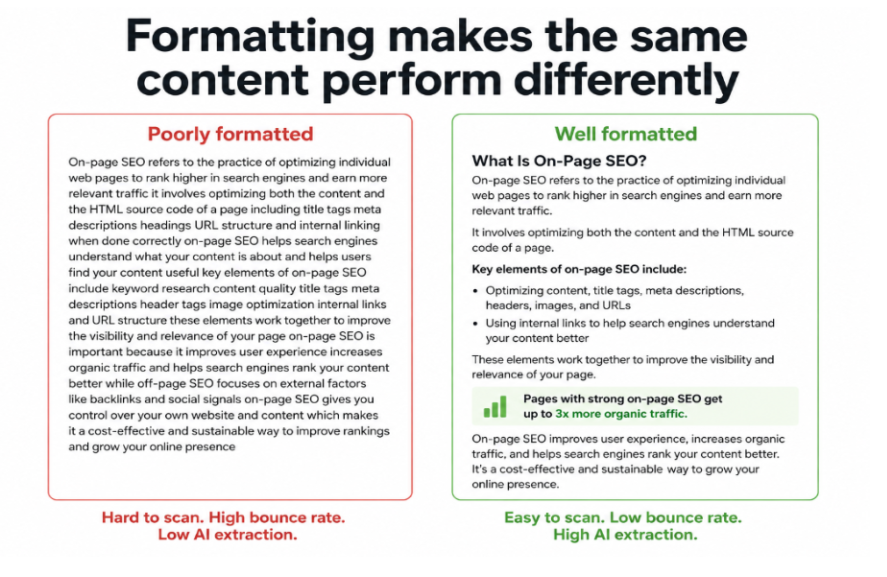
Content quality and content formatting are two different problems. A page can contain excellent information and still perform poorly in search because users cannot find the parts they need, cannot read it comfortably on mobile, and bounce before they get to the answer they came for. Every bounce is a negative signal. Every signal of poor engagement compounds over time into lower rankings.
This guide covers every formatting decision that affects SEO performance: heading structure, paragraph length, sentence clarity, lists, tables, visual assets, and mobile considerations.
Why formatting affects SEO
Formatting affects SEO through three distinct mechanisms. Understanding all three prevents the common mistake of treating formatting as purely an aesthetic concern.
| Mechanism | How formatting drives it | The SEO outcome |
|---|---|---|
| User engagement signals | Clear structure reduces cognitive load. Users stay longer, scroll deeper, and visit more pages when content is easy to navigate. | Lower bounce rate and higher dwell time feed the behavioral quality signals Google uses to evaluate content. |
| Crawl and parse efficiency | Logical heading hierarchies and semantic HTML help search engine crawlers segment content correctly, understand topic structure, and identify key passages. | More accurate indexing and stronger relevance signals for target queries. |
| AI extraction and citation | AI retrieval systems extract at the passage level. Well-formatted sections with clear headings and self-contained paragraphs are dramatically more extractable than dense prose. | Higher probability of being cited in ChatGPT, Perplexity, Claude, and Google AI Overviews. |
The three mechanisms work together. A page formatted for human readability is also formatted for crawler efficiency and AI extraction, because all three systems share the same preference: clear structure, logical hierarchy, and content organized around specific questions and answers.
Heading structure: the framework that everything else builds on
Headings are the most important structural element in any piece of content. They communicate the page's topic hierarchy to search engines, act as navigation anchors for users who scan before reading, and serve as the primary extraction targets for AI systems looking for specific answers within long-form content.
How to use H1, H2, and H3 correctly
The H1 appears once per page and names the page's primary topic. It should contain the primary keyword and align closely with the title tag. Multiple H1 tags on a single page send a confused signal about what the page is primarily about.
H2 tags define the major sections of the page. Each H2 should cover one complete subtopic and ideally be phrased as a question that mirrors a real user query. Question-based H2s align with the format AI systems generate as sub-queries during fan-out retrieval and capture People Also Ask placement opportunities at the same time. H3 tags handle supporting detail, specific examples, or sub-categories within each H2 section.
The most common heading mistake is using headings as visual decorators rather than as structural signals. Headings that are vague ("More information", "Details"), generic ("Overview", "Introduction"), or label-style rather than descriptive ("Features" instead of "What features does X include?") provide almost no signal value to either users or search engines. Every heading should tell a reader exactly what they will get if they read the section beneath it. Full heading implementation guidance is in the header structure guide.
Paragraph length and sentence structure
Online readers scan before they read. When a user lands on a page, their eye moves down the page looking for the specific information they need before they commit to reading in full. Dense paragraphs force them to read everything to find anything. Short paragraphs let them locate the right section in seconds.
The paragraph length rule
Aim for two to four sentences per paragraph for body content. Each paragraph should make one point. When you have finished making that point, start a new paragraph. If you find yourself writing a paragraph that runs seven or eight sentences and covers three connected ideas, break it into three paragraphs, each focused on one idea.
Short paragraphs also improve AI extraction. AI retrieval systems evaluate content at the passage level. A five-sentence paragraph that addresses one specific question is a cleaner extraction unit than a ten-sentence paragraph that addresses two questions half-heartedly. Shorter, focused paragraphs give AI systems more clean extraction points per page.
Sentence length and clarity
Keep average sentence length under 20 words. Sentences that run beyond 25 to 30 words typically contain more than one idea and require the reader to hold multiple clauses in memory while parsing. This increases cognitive load, slows reading speed, and increases the chance the reader loses the thread and stops.
Use active voice over passive voice wherever possible. Active voice is more direct, more concise, and easier to process. "AI systems evaluate content at the passage level" is faster to read and understand than "Content is evaluated at the passage level by AI systems." The difference compounds across a 2,000-word article into significantly better readability scores and measurably lower cognitive load for users.
Write at a reading level of Grade 7 to 9 for most content. Google prefers web page copy at a reading level between Grade 6 and 9 for featured snippets and voice search responses. Simple language does not mean simple thinking. It means precise language that communicates complex ideas efficiently without unnecessary complexity in the expression itself.
Using bullet points and numbered lists
Lists are one of the most effective formatting tools for both readability and SEO. They break up dense text, make parallel items easier to compare, and create clean extraction points for featured snippets and AI-generated summaries.
When to use bullet points
Use bullet points for items without a natural sequence: features of a tool, reasons for a phenomenon, examples of a concept, elements of a framework. Bullets communicate that the items are parallel and independent. Use them when the order of the list does not change the meaning.
When to use numbered lists
Use numbered lists for sequential steps where order matters: a process, a workflow, an installation guide, a strategic framework. Numbers communicate sequence and allow readers to track their progress. AI systems also extract numbered steps more cleanly than prose descriptions of the same process, because the sequence is made explicit.
List formatting rules
- Keep list items consistent in length and structure: a list where some items are one word and others are full sentences looks inconsistent and is harder to scan.
- Write at least two sentences of introductory context before a list: a list that appears without context leaves users unsure what the items represent.
- Do not turn entire pages into bullet lists: lists communicate discrete items. Narrative argument, explanation, and analysis belong in prose. Overusing lists makes pages feel shallow.
- Avoid nested bullets more than one level deep: deeply nested bullet lists are hard to scan and rarely necessary. If you need that level of hierarchy, use subheadings instead.
Tables for comparisons and structured data
Tables are the clearest format for comparison, and they are among the most extractable content formats for AI systems. Comparison pages with three or more tables earn 25.7% more ChatGPT citations than those without. When you are comparing options, showing differences between approaches, or presenting parallel data across multiple subjects, a table communicates the relationships more clearly and more efficiently than prose.
Use tables for tool comparisons, feature breakdowns, pricing tiers, before-and-after examples, and any scenario where you are presenting the same attributes across multiple subjects. Keep tables to a width that renders correctly on mobile. Avoid tables with more than six or seven columns, as they become difficult to read on smaller screens without horizontal scrolling.
Visual assets: images, charts, and video
Visual assets improve time on page, support complex explanations, and create additional indexing opportunities through Google Image Search and video search. Every image on a page should have descriptive alt text that reflects both what the image shows and why it exists on this specific page. The full alt text optimization framework is in the image alt text guide.
Charts and data visualizations are particularly valuable for AI citation. When you have original data to share, visualizing it in a chart makes the data both easier to understand for readers and more memorable as a standalone reference that other publications want to embed and attribute. Charts that are embedded with figure captions including the key finding are more likely to be discovered, linked to, and cited.
Embedding YouTube videos in blog posts creates a secondary traffic channel through YouTube Search and signals to Google that the page contains rich multimedia content. YouTube content now ranks directly in traditional Google search results, and embedding relevant videos in articles has been associated with ranking improvements by multiple practitioners. Create videos for your ten highest-traffic articles, embed them in the corresponding articles, and optimize the video titles and descriptions for the same target queries.
Mobile formatting
More than 60% of global web traffic comes from mobile devices, and Google uses mobile-first indexing, meaning it evaluates your mobile page as the primary version for ranking purposes. Poor mobile formatting is not just a user experience problem. It is a ranking problem.
Mobile formatting requires shorter paragraphs than desktop because smaller screens show fewer lines at a time, making dense text feel more overwhelming. Font size should be at least 16px for body text so users do not need to zoom. Tap targets for buttons and links should be at least 44px by 44px to be reliably clickable with a thumb. Tables must be either responsive (adapting to screen width) or presented in an alternative format on mobile, since wide tables that require horizontal scrolling create a frustrating experience on small screens.
The FAQ section: a formatting investment with compounding returns
A well-structured FAQ section at the bottom of every substantial guide produces returns across multiple channels simultaneously. For traditional search, FAQ sections with FAQ schema markup are eligible for FAQ rich results in Google, which expand the page's SERP footprint with dropdown question previews. For AI search, FAQ sections are among the most extractable content formats because they explicitly match the question-and-answer structure of AI-generated sub-queries during retrieval.
Write three to five FAQ questions that cover the genuine follow-up questions a reader would have after consuming the main content. Phrase them as users would actually ask them, not as you would frame them internally. Keep answers to two to four sentences each: long enough to be genuinely useful, short enough to be used as a direct AI response without paraphrasing. Add FAQ schema markup to every FAQ section to maximize rich result eligibility.
Before vs. after: formatting in practice
Before: unformatted content
A 2,200-word guide on keyword research is published as eight long paragraphs with no subheadings beyond the H1. The content is accurate and thorough but completely unbroken. Users land on the page, scroll briefly, do not immediately see the specific answer they came for, and bounce. Time on page averages 45 seconds. The page ranks on page two but does not move despite strong backlinks pointing to it.
After: reformatted with the same content
The same content is restructured with ten descriptive H2 and H3 headings phrased as questions, paragraphs broken into two to three sentences each, a comparison table showing keyword tools, a numbered step list for the research process, and a six-question FAQ section with schema markup added. Average time on page rises to four minutes and twenty seconds. The page moves to position three within six weeks. It begins appearing in Google AI Overviews for related queries. No new content was added. Only the structure changed.
Formatting best practices summary
| Element | Best practice | Why it matters |
|---|---|---|
| H1 | One per page. Contains primary keyword. Aligns with the title tag. | Primary topic signal for search engines and users. |
| H2 headings | Phrase as questions. One per major section. Cover one complete subtopic each. | Navigation for users. Extraction targets for AI. Relevance signals for search engines. |
| H3 headings | Supporting detail under each H2. Descriptive, not generic. | Sub-structure that improves scannability and parse efficiency. |
| Paragraph length | Two to four sentences. One idea per paragraph. | Reduces cognitive load. Creates cleaner AI extraction units. |
| Sentence length | Under 20 words average. Active voice preferred. | Improves readability score. Reduces bounce rate. |
| Bullet points | For parallel, unordered items. At least two items. Consistent formatting. | Improves scanability. Creates featured snippet extraction opportunities. |
| Numbered lists | For sequential steps and processes where order matters. | Communicates sequence clearly. AI extracts numbered steps cleanly. |
| Tables | For comparisons, parallel data, and structured information. | 25.7% more ChatGPT citations for pages with three or more tables. |
| Images | Descriptive alt text on every image. WebP format. Compressed file size. | Image Search visibility. Topical relevance reinforcement. Page speed. |
| FAQ section | Three to five genuine follow-up questions. Two to four sentence answers. FAQ schema. | Rich result eligibility. AI sub-query extraction. Voice search capture. |
| Mobile formatting | 16px minimum font. Responsive tables. Short paragraphs. 44px tap targets. | Mobile-first indexing. Core Web Vitals. User experience on 60%+ of traffic. |
Common formatting mistakes
| Mistake | Why it hurts | Fix |
|---|---|---|
| Walls of dense, unbroken text | Users bounce within seconds. AI cannot extract clean passages. Engagement metrics decline. | Break into two to four sentence paragraphs. Add subheadings every two to three sections. |
| Generic or vague headings | No signal value for search engines or users. Missed AI extraction opportunity. | Phrase every H2 and H3 as a specific question or clear topic statement. |
| Overusing bullet points for everything | Pages that are mostly lists feel shallow. Lists cannot replace narrative analysis. | Use bullets for genuinely parallel items. Use prose for explanation, argument, and analysis. |
| Missing alt text on images | Images invisible to search engines and screen readers. Missed topical relevance signal. | Write descriptive, context-specific alt text for every image on the page. |
| No FAQ section on guides | Missed rich result eligibility. Missed AI sub-query extraction opportunity. | Add three to five FAQ questions with schema markup to every substantial guide. |
| Not optimizing for mobile | Poor mobile experience signals low quality to Google's mobile-first index. | Test every page on mobile before publishing. Check font size, paragraph length, and table width. |
Conclusion
Content formatting is not a finishing touch applied after writing. It is a structural decision that shapes whether users stay or leave, whether search engines correctly understand the page's hierarchy, and whether AI systems can extract and cite specific passages in generated answers. The same formatting decisions that reduce bounce rates and improve dwell time also improve AI citation rates, because all three systems share the same fundamental preference for content that is clear, well-structured, and organized around specific questions and answers.
The practical approach is straightforward: write with short paragraphs and clear sentences, structure every page with descriptive question-based headings, use tables for comparisons, use lists for parallel items, add a FAQ section with schema markup, optimize every image with alt text, and test every page on mobile before publishing. Apply these standards as defaults in every content brief so that formatting becomes part of production rather than a post-publish fix. Combine this guide with the content optimization guide for the full framework covering both what to write and how to structure it for maximum search and AI visibility.


![What is Conversion Rate Optimization in AI search [2026]](https://cdn.sanity.io/images/cjp3nw01/production/cd66159971e24090347c156ab261051389e40d8a-1200x628.png)