Most pages that fail to rank are not failing because of backlinks or technical issues. They are failing because search engines cannot quickly understand what the page is about. Keyword placement fixes that. It is the practice of placing your target keywords in the right locations on a page so search engines can quickly confirm relevance, and readers immediately know they landed in the right place.
This guide covers exactly where keywords belong on a page, why placement matters more than density, and how to apply it without making your content feel forced or repetitive. You will also see real examples, a step-by-step workflow, and the most common mistakes that quietly hold rankings back.
What does keyword placement mean in practice
Keyword placement is not about repeating the same phrase everywhere on a page. It is about choosing one primary keyword for a page and positioning it in the specific locations where search engines look first to understand what a page covers.
At its core, placement connects three things: what users are searching for, what your page delivers, and how search engines interpret that match. When your keyword appears in the right places and fits naturally into the content, it reinforces meaning instead of distracting from it.
Every page typically has one primary keyword that defines its main focus, a small set of supporting terms that add context, and natural-language text that fully explains the topic. Search engines use these signals together to evaluate relevance. This is why nearly 100% of page-one results include their target keyword in the title, or H1 placement in those locations is a non-negotiable ranking signal.
Why keyword placement still matters in 2026
Search engines do not just check whether a keyword exists somewhere on a page. They evaluate where it appears and how it is used. A keyword buried in the footer carries almost no weight. The same keyword in the title tag and H1 tells Google immediately what the page is about.
Placement also matters for users. Clear keywords in titles, headings, and introductions set expectations before someone even starts reading. When users see their search term reflected in the page immediately, they stay. When they do not, they bounce, and high bounce rates are a signal that hurts rankings over time.
Keyword placement works alongside other on-page SEO factors. Content quality, page structure, and internal linking all amplify or weaken the impact of placement. On its own, placement will not save thin content, but without it, even strong content can underperform significantly.
Where keyword placement has the most impact
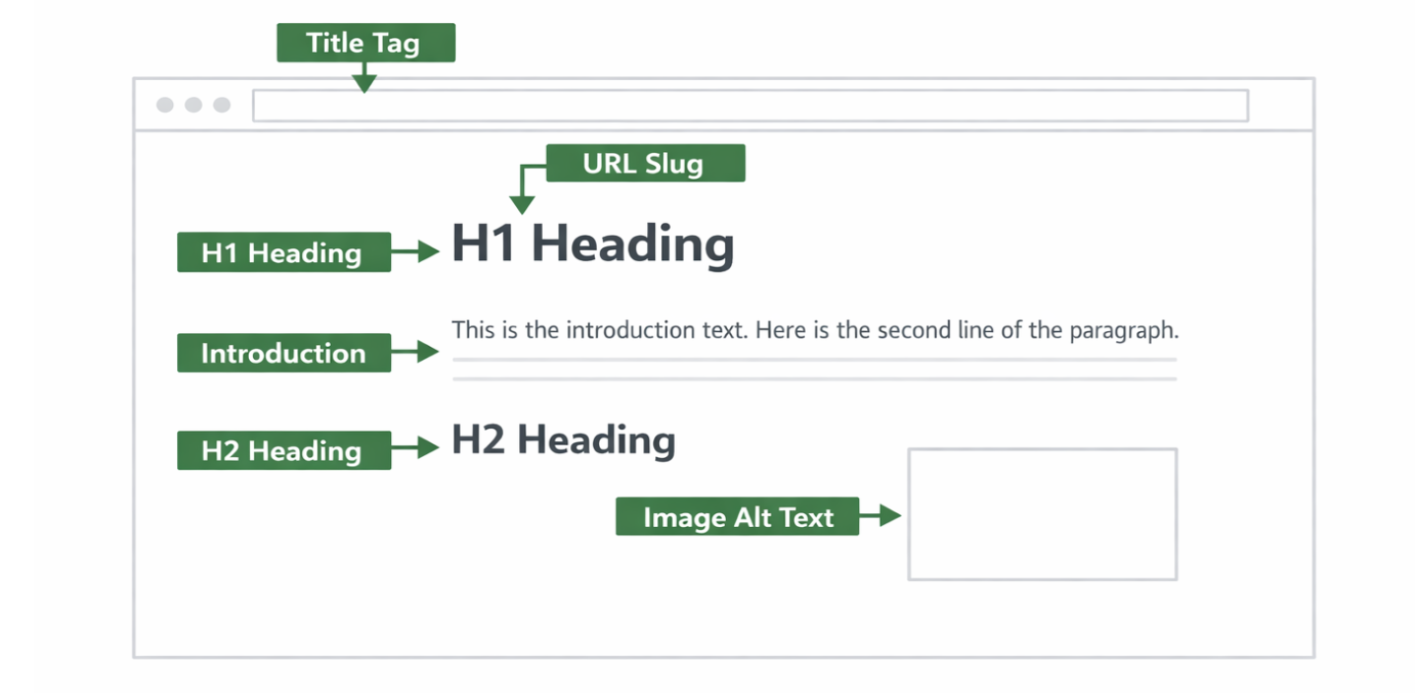
Some areas of a page carry more weight than others. These are the locations search engines scan first to determine relevance. Getting these right is more important than how many times your keyword appears in the body text.
Page element | Why it matters | How to use keywords |
Title tag | Primary relevance signal in SERPs | Include the main keyword naturally, preferably near the start |
H1 heading | Defines the page topic for crawlers and users | Use the primary keyword once, clearly |
Introduction | Confirms intent in the first 100 words | Mention the main keyword early, naturally |
H2 and H3 headings | Structure and subtopic signals | Use variations and related terms where relevant |
URL slug | Context and clarity signal | Keep it short, keyword-focused, no stop words |
Body content | Depth and semantic completeness | Use keywords naturally across sections |
Internal link anchor text | Topical relationships between pages | Use descriptive, keyword-relevant anchor text |
Image alt text | Accessibility and image search signal | Describe the image accurately, include keywords only if genuinely relevant |
Meta description | Influences CTR, not rankings directly | Include the keyword once to mirror search language |
Not every page needs keywords in every single location. The goal is clarity and relevance, not mechanical coverage.
Keyword placement examples
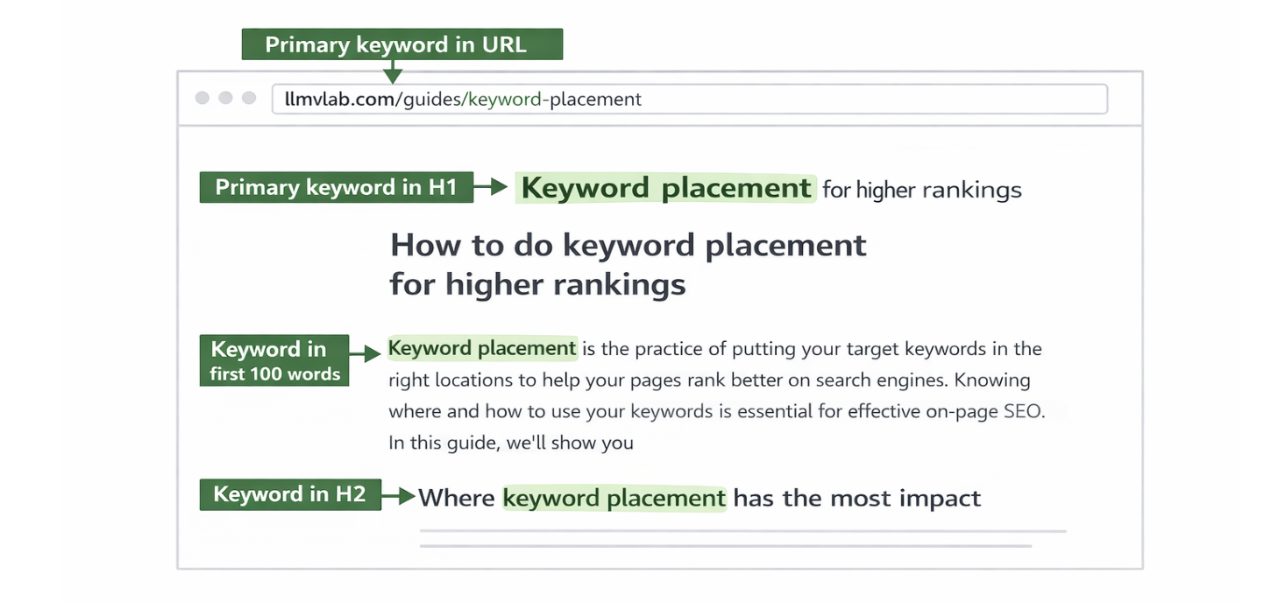
The fastest way to understand good keyword placement is to see it applied to real page elements.
Example 1: Title tag
Weak: A guide about placing keywords on your website for search engine optimization purposes
Strong: How to do keyword placement for higher rankings
The strong version puts the primary keyword near the start, stays under 60 characters, and tells the reader exactly what the page delivers.
Example 2: Introduction paragraph
Weak: Welcome to our comprehensive guide. Today, we will be talking about various aspects of SEO, including some tips that might help your content.
Strong: Most pages that fail to rank are not failing because of backlinks. They are failing because search engines cannot understand what the page is about. Keyword placement fixes that.
The strong version gets to the primary keyword in the first sentence. The reader immediately knows what the page covers.
Example 3: URL slug
Weak: llmvlab.com/guides/page-12345-seo-tips-updated
Strong: llmvlab.com/guides/keyword-placement
Short, clean, keyword-focused URLs perform better. Including a keyword in your URL can improve CTR by up to 45%, making the URL one of the highest-value placement opportunities on the page.
Example 4: Image alt text
Weak: alt="image1.png"
Strong: alt="keyword placement diagram showing title tag and H1 locations"
Alt text should describe what is actually in the image. The keyword fits naturally here because the image genuinely shows keyword placement.
How to do keyword placement step by step
Follow this workflow for every page you create or optimize. It takes 15 to 20 minutes per page and prevents the most common placement mistakes.
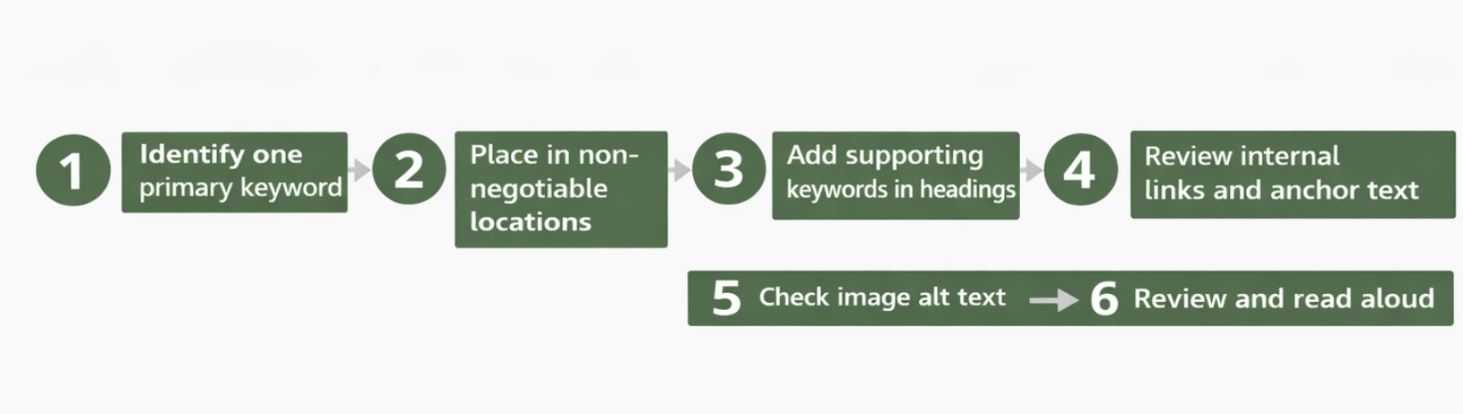
Step 1: Identify one primary keyword
Every page needs one clear primary keyword, the term that best describes what the page is about. Do your keyword research first and pick the term with the best balance of search volume and relevance to the page topic. Do not try to optimise a single page for multiple unrelated primary keywords.
Step 2: Place it in the non-negotiable locations
Before writing a word of body content, make sure your primary keyword appears in:
Title tag - as close to the start as naturally possible
H1 heading - once, clearly
URL slug - short and clean
First 100 words of the introduction
These four locations carry the most weight. Everything else is secondary.
Step 3: Use supporting keywords in headings and body
Supporting keywords are related terms, synonyms, and variations that help search engines understand the full topic. They should appear naturally in H2 and H3 headings and throughout the body. This is closely tied to keyword clustering, where you group related terms and cover them all on one page rather than creating separate competing pages.
Step 4: Review internal links and anchor text
Internal links pointing to a page should use descriptive anchor text that includes the target keyword where natural. Avoid generic anchors like "click here" or "read more". Descriptive anchors reinforce the topic of the destination page and help search engines understand page relationships. Read our full guide on internal linking for more on this.
Step 5: Check image alt text
Go through every image on the page. Write alt text that accurately describes what is in the image. If the keyword fits naturally, include it. If it does not fit naturally, do not force it. Screen readers use alt text for accessibility, which is their primary purpose.
Step 6: Review and read aloud
Read the full page aloud after writing. If any sentence sounds unnatural or forced, the keyword placement is wrong. Good placement should be invisible to the reader; they should never notice it.
Keyword placement best practices
These practices separate pages that rank consistently from those that plateau and never move.
Place the primary keyword in the title as early as naturally possible. Titles with the keyword near the start score higher relevance signals than titles where it appears at the end.
Never use the same keyword as the primary term on two different pages. That creates keyword cannibalisation, both pages compete and neither wins. Assign each keyword to exactly one page.
Use the primary keyword in the introduction within the first two sentences if possible. Search engines weigh early mentions more heavily than later ones.
Do not repeat the primary keyword more than once every 200 to 300 words in the body. After the first few placements, switch to related terms and synonyms. Modern search engines understand context.
Keep URL slugs short and keyword-focused. Remove stop words like 'and', 'the', and 'for'. Use hyphens between words. Never use underscores.
Use question-based H2S and H3S where the topic naturally calls for it. Questions match the way people search and improve the chance of appearing in People Also Ask boxes.
Write meta descriptions with the keyword once. It does not affect rankings directly, but when the keyword appears in the snippet, it gets bolded in search results, which improves CTR.
Review placement after every major content update. If you rewrite a section, check that the primary keyword still appears in the right locations and has not been accidentally removed.
Common keyword placement mistakes
Most keyword placement problems are not obvious. They tend to be subtle and cumulative, individually small, but together they quietly suppress rankings.
Mistake | Why it hurts | What to do instead |
Keyword stuffing | Reduces readability, triggers spam signals | Use natural language and synonyms throughout |
Keyword only in body, not title or H1 | Missed the highest-weight placement signals | Always place the title and H1 first |
Using an exact match keyword in every anchor | Looks manipulative to search engines | Vary anchor text naturally across internal links |
Generic URL slugs with no keyword | Missed a high-value CTR signal | Always include the primary keyword in the URL |
Keyword in title but not in intro | Intent mismatch signal for crawlers | Confirm the keyword in the first 100 words |
Same keyword on multiple pages | Keyword cannibalisation splits authority | One keyword, one page always |
Forcing keywords into alt text | Looks spammy, hurts accessibility | Write alt text for the image first, keyword second |
Keyword density vs keyword placement
Keyword density, which is how many times a keyword appears as a percentage of total word count, is one of the most misunderstood concepts in SEO. Many beginners obsess over hitting a specific density percentage. This is the wrong approach.
There is no ideal keyword density. Google does not use it as a ranking factor. What matters is that your keyword appears in the right locations, title, H1, intro, URL and that the rest of the content covers the topic thoroughly using natural language, synonyms, and related terms.
A page that mentions its keyword 30 times in the body but misses the title tag will underperform against a page that uses it twice in the body but nails every high-weight location. Placement beats density every time. This is directly connected to how keyword difficulty works. Harder keywords require stronger placement signals across more high-weight locations, not just more repetitions.
Keyword placement and AI search visibility
AI-powered search engines like ChatGPT Search, Perplexity, and Google's AI Overviews use keyword placement signals differently from traditional search. They do not just look at whether a keyword is present; they evaluate whether the page clearly and consistently answers the question implied by that keyword.
For AI search, the most important placement signals are in headings and structured content. AI models pull answers from pages that are clearly organized with descriptive H2S and H3S, short paragraphs, and early confirmation of the topic in the introduction. A page where the primary keyword is buried deep in the body with no heading structure is much harder for an AI model to cite confidently.
The practical implication: structure your page so every section heading clearly signals what that section covers. Use the primary keyword in the H1 and use related terms in H2S. This is also why title tags have become even more important. AI models use title information to understand page scope before reading the full content.
How to measure if keyword placement is working
After optimizing placement, give the page 4 to 8 weeks to show movement in search results. Then measure using these signals:
Average position in Google Search Console - is the page appearing higher for the target keyword?
Impressions - is the page being shown for more queries related to the primary keyword?
CTR - if the title and meta description have the keyword, are more people clicking?
Time on page - are users staying, which signals that intent is being matched correctly?
If impressions are rising but CTR is flat, the title tag needs work. If rankings are improving but slowly, the placement is correct, but the page may need more supporting content depth. Use the data to diagnose the specific issue rather than changing everything at once.
Final thoughts
Keyword placement is one of the simplest and highest-impact things you can do for a page. It does not require tools, budget, or technical skills. It just requires putting the right words in the right places: title, H1, introduction, URL, and supporting headings and then writing content that genuinely covers the topic.
The mistake most people make is either ignoring placement entirely and hoping content quality alone will rank, or overcorrecting into keyword stuffing that reads unnaturally. The answer is in the middle: precise placement in high-weight locations, natural language everywhere else.
Get placement right on every page you publish, and you will build a compounding advantage over sites that never think about it at all.