What is conversion rate optimization in AI search [2026]
Most websites are built to convert Google traffic. But in 2026, a growing slice of your visitors are arriving from somewhere else entirely: ChatGPT, Perplexity, Claude, and Google AI Overviews. These visitors behave differently, expect more, and convert at higher rates — when the page they land on is ready for them.
This guide explains what CRO means specifically for AI search traffic, why it is different from optimizing for regular organic visitors, and the practical steps you can take to convert more of it.
What is CRO in AI search?
CRO stands for Conversion Rate Optimization. It is the practice of improving how many of your website visitors take the action you want signing up, buying, booking a demo, or filling in a contact form.
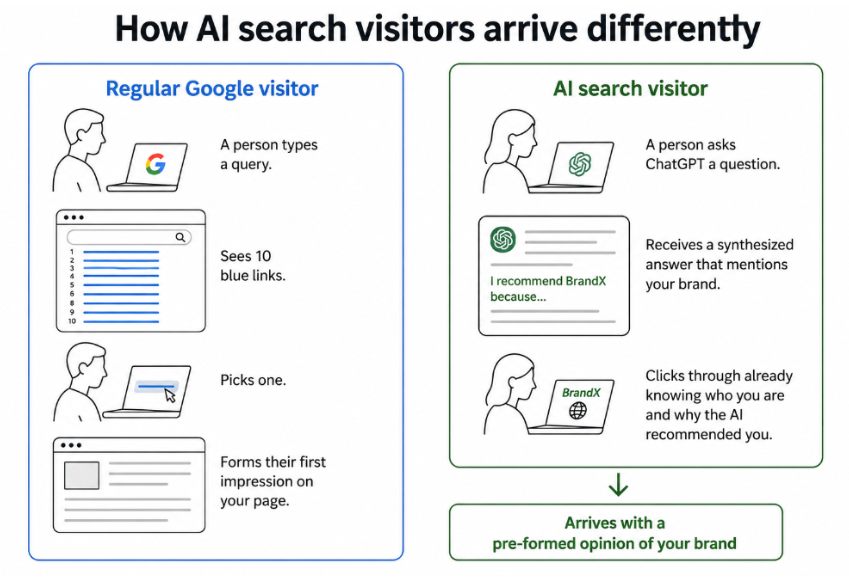
In AI search, CRO has a specific twist. When someone uses ChatGPT or Perplexity and clicks a link in the AI's response, they arrive at your site already knowing a little about you. The AI told them something. That changes the conversion dynamic completely compared to a user who found you through a Google search result and formed their own first impression.
AI-referred traffic converts at approximately 7% on high-traffic sites, compared to around 5.8% for standard organic search. The volume is small — typically under 2% of total sessions — but the intent quality is higher than almost any other channel.
How AI visitors are different from regular organic visitors
Before you can optimize for AI search traffic, you need to understand what makes these visitors behave differently. The table below shows the key contrasts:
| Regular organic visitor | AI search visitor | |
|---|---|---|
| They arrive... | Having seen a list of results and chosen yours | Having already read an AI summary that mentioned your brand |
| Brand awareness | Low — may be discovering you for the first time | Higher — the AI already described who you are |
| What they want | To find information and explore | To verify, go deeper, or take action |
| How patient they are | Willing to browse and click around | Want the answer fast — lower tolerance for confusion |
| Conversion rate | 2 to 5% across most industries | 5 to 7% for high-traffic sites |
| If the page disappoints... | They go back to Google and try another result | They go back to the AI and try a different recommendation |
The key insight: AI visitors arrive with expectations already set by what the AI told them. If your page matches that expectation, they convert easily. If it does not match, they leave immediately — and they leave faster than regular visitors because their tolerance for confusion is lower.
AI search CRO works on two levels
Most CRO guides focus entirely on the landing page — the design, the copy, the CTA. That matters here too. But AI search CRO has a second level that traditional CRO does not: what the AI says about you before the visitor even clicks.
Level 1: what the AI says about you (upstream)
When ChatGPT or Perplexity mentions your brand in a response, that description becomes the visitor's first impression. If the AI says you are "the best tool for small business keyword research" and the visitor arrives expecting exactly that — but your homepage talks about enterprise SEO — the mismatch kills the conversion before it had a chance.
This is why LLM visibility strategies and CRO are now connected. You cannot fully fix a bad AI description by optimizing your landing page. You fix it by publishing clear, accurate content that AI systems learn from over time.
Level 2: what your page does after they click (on-page)
Everything that happens after the click is standard CRO territory: the page design, the headline, the CTA, the load speed, the trust signals. But because AI visitors arrive with higher intent and stronger expectations, every friction point costs more. A confusing CTA that loses 10% of regular organic visitors might lose 20% of AI visitors.
How to optimize your pages for AI search visitors
1. Check what the AI is actually saying about you
This is the starting point. Open ChatGPT, Perplexity, and Google AI Mode. Search for queries related to your product or service. Read exactly how your brand is described in the responses. Then visit the page the AI links to and ask: does this page match what the AI just told me to expect?
If the AI says you offer X but your page talks about Y, you have a message mismatch. Fix it by either updating the page copy to reflect what the AI describes, or by publishing clearer content so AI systems learn the accurate description over time.
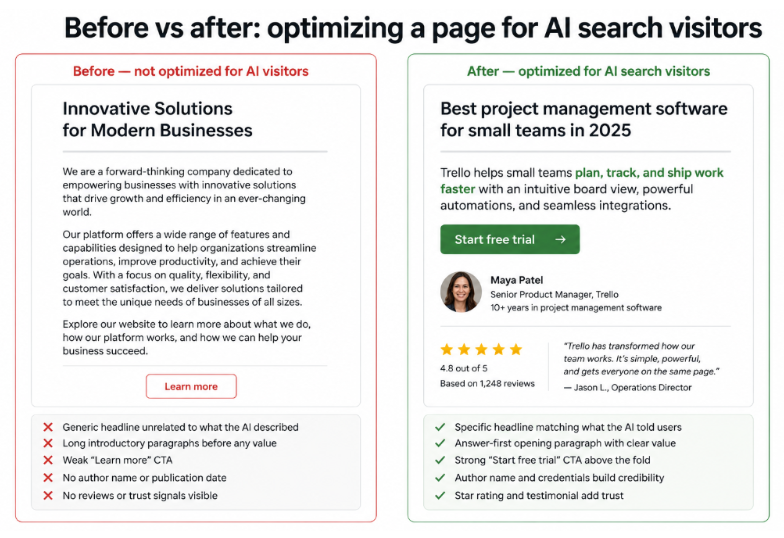
2. Lead with the answer — not the introduction
AI visitors already got the context from the AI. When they land on your page, they do not need a warm-up. They need the specific thing they came for, immediately.
Instead of: "Welcome to our guide on keyword research tools for small businesses. In this article, we will cover..."
Write: "The five best keyword research tools for small businesses in 2026 are: [list]. Here is how each one works and who it is best suited for."
This answer-first approach reduces the time between arriving and finding value. The faster a visitor finds what they came for, the more likely they are to stay and convert.
3. Add the right CTA for high-intent visitors
AI visitors have often done their research. They are not in discovery mode — they are in decision mode. A generic top-of-funnel CTA like "learn more" or "subscribe to our newsletter" is under-powered for where they are in the buying journey.
If an AI described your product as a solution to their specific problem, they are ready for: a free trial, a demo request, a direct purchase, or a specific comparison. Single CTA pages convert 32% better than those with two or more competing CTAs. Pick one clear next step for each page and make it match the intent of the AI traffic landing there.
4. Make your credibility obvious at a glance
AI visitors arrive expecting the source the AI implied. They want fast confirmation that you are legit. Credibility signals that work particularly well for AI-referred traffic:
- Author name and credentials: Who wrote this? Do they know their subject?
- Published and last-updated date: Is this current or outdated?
- Cited sources with links: Are the claims backed up or just asserted?
- Reviews, ratings, or case studies: Has this worked for people like me?
A page that shows none of these signals creates a credibility gap between what the AI implied and what the page demonstrates. That gap is a conversion killer.
5. Make the page fast
A one-second improvement in page load time boosts conversions by 7%. AI visitors arrive with high intent but low patience. A slow page gives a decisive user four seconds to reconsider and navigate back to the AI to find a different recommendation. Prioritize load speed — especially LCP — on the pages that receive the most AI-referred traffic. The Core Web Vitals guide and site speed guide cover exactly how to do this.
How to measure your AI search CRO performance
You cannot improve what you cannot see. Standard analytics lump all traffic sources together. To measure AI search CRO properly, you need to separate AI-referred sessions from everything else.
Step 1: create an AI referral segment in GA4
In Google Analytics 4, go to Explore and create a custom segment filtering for sessions where the referral source matches these domains:
- chatgpt.com
- perplexity.ai
- claude.ai
- gemini.google.com
- copilot.microsoft.com
Track this segment separately from organic search. Look at conversion rate, session duration, pages per session, and which pages they enter on. This is your baseline.
Step 2: find your top AI entry pages
Which pages are receiving the most AI-referred traffic? These are the pages where your CRO effort will have the highest impact. A page with 500 AI-referred monthly sessions and a 2% conversion rate is leaving ten conversions per month on the table if the average AI-referred rate should be 6%.
Step 3: run a monthly AI description audit
Once a month, search fifteen to twenty of your target queries across ChatGPT, Perplexity, and Google AI Mode. Record: what does the AI say about your brand? Is it accurate? Does it match your landing page? Any inaccuracies you find are both a CRO problem and an LLM visibility problem — fix them by publishing clear, accurate, well-structured content.
Common mistakes that hurt AI search CRO
| Mistake | Why it hurts | Fix |
|---|---|---|
| Using the same CTAs for AI and organic traffic | AI visitors are in decision mode — generic CTAs are too weak for their intent level | Test higher-commitment CTAs (free trial, demo) on pages with high AI-referred traffic |
| Slow pages on AI entry points | High-intent visitors abandon slow pages faster than browsers — every second counts more | Prioritize LCP under 2.5 seconds on your top AI-referred entry pages |
| Not checking what AI says about you | Message mismatch between AI description and landing page kills conversion invisibly | Run a monthly query log across ChatGPT, Perplexity, and Google AI Mode |
| Ignoring 404 errors from AI referrals | AI platforms sometimes invent URLs — sending high-intent visitors to broken pages | Monitor GA4 for 404s from AI referral sources monthly. Set up 301 redirects. |
| No trust signals on entry pages | AI visitors expect the credible source the AI implied — a bare page creates doubt | Add author credentials, dates, cited sources, and reviews on every key page |
Conclusion
AI search CRO is not a completely new discipline. It builds on everything CRO has always been about: clear messaging, strong CTAs, fast pages, and visible trust signals. What changes is the starting point.
AI visitors arrive already knowing something about you. If what they find on your page matches what the AI told them, conversion is straightforward. If it does not, no amount of page design will save the session.
Start with measurement: set up your GA4 AI referral segment, identify your top AI entry pages, and run a monthly check on what AI platforms are saying about your brand. Then work through the five optimizations in this guide — message match, answer-first structure, high-intent CTAs, credibility signals, and page speed. Apply them to your highest-traffic AI entry pages first and measure the difference. That is how you turn a small but high-converting traffic channel into a meaningful revenue driver.